Design focuses on the data layer—tables, keys, relationships, and queries. Forms and reports are the presentation layer built on top. We always stabilize the schema first so screens and printouts stay reliable when requirements change.

Trusted by 500+ businesses to solve complex database challenges.
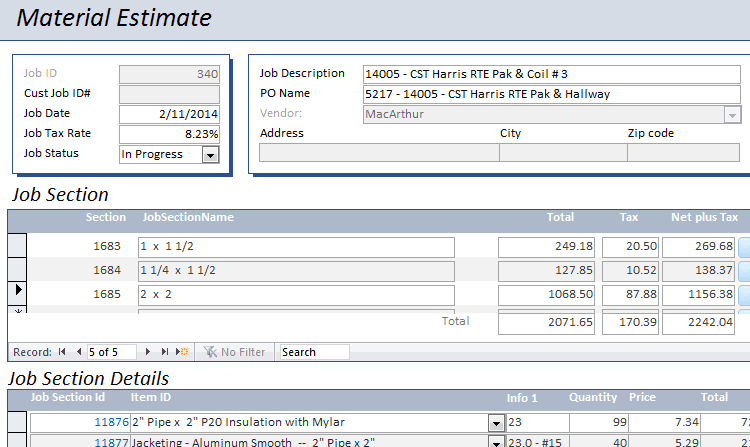
Companies trust us to create custom Access database design applications. We can help you design and build your own custom business software that works exactly the way you want. Tables, forms, queries, VBA code. Engaging us, you leverage our experience of delivering dozens of large, successful custom Access projects in a wide variety of industries and business areas.
These databases are highly customized, can deploy in 3 – 6 weeks with cost of $1,000 – $10,000 to the client, and usually are extremely high ROI and a fraction of the cost of comparable applications. They can be implemented without purchasing Access licenses for users by utilizing Access Runtime.
Take a look at some of these actual recent projects to see how we might be able to help you.
Access database design is the structural foundation every reliable Microsoft Access solution depends on. Before a single form or report is built, tables must be normalized, primary and foreign keys defined, and relationships drawn so data stays consistent as your organization grows. AccessDeveloper consultants begin every project with a schema review: we map entities (customers, orders, inventory items, projects), decide where lookup tables belong, and document how front-end objects will bind to the back-end tables. Whether you are starting a greenfield ACCDB or refactoring a file that has outgrown its original layout, sound database design prevents duplicate records, broken joins, and slow queries later.
Database design in Access is not only about tables. Every bound form inherits the integrity rules you set at the table level, and every grouped report depends on relationships being correct in the Relationships window. We plan which tables appear on data-entry forms, which fields belong in subforms, and how report group levels map to your organizational hierarchy before development starts. That upfront alignment means fewer rework cycles when stakeholders request new screens.
Poor design shows up as bloated ACCDB files, hourglass cursors on open, and timeout errors when two users edit related records. We size memo and attachment fields carefully, avoid storing calculated values that should live in queries, and test with realistic record counts. For linked SQL Server tables, we design pass-through and local snapshot strategies so Access remains a capable front end rather than a bottleneck.
Database design engagements follow a structured path from workshop to sign-off—no surprise scope after development starts.
AccessDeveloper has provided Microsoft Access consulting since 2010 from Utah, serving clients remotely across the United States and Canada. Senior consultants answer the phone at 385-386-3860—often the same day you call.
Custom database design and development projects typically run three to six weeks with investments from $1,000 to $10,000 depending on schema complexity. We also deliver ongoing support services and migration expertise when your design must scale to SQL Server.
A North Carolina contracting company engaged us for a focused report-and-schema fix delivered in four hours at our $90 per hour rate—an example of the practical outcomes design clarity enables.
Here are some answers to help you hone in on the information you need. That's our style as an Access Developer. We make doing business with us an easy and enjoyable experience.
Design focuses on the data layer—tables, keys, relationships, and queries. Forms and reports are the presentation layer built on top. We always stabilize the schema first so screens and printouts stay reliable when requirements change.
Yes. We migrate data into new normalized tables with append queries and validation scripts, then reconnect forms and reports to the improved structure. Existing records are preserved and verified before go-live.
When you expect more than a few concurrent writers, need row-level security, or store millions of rows. We design the Access front end to link cleanly to SQL Server so you gain capacity without abandoning familiar forms.
Every design engagement includes an entity-relationship diagram, table specifications, and notes on indexes and relationships. Your internal team can use this documentation for onboarding and future enhancements.
Small operational databases often need one to two weeks of design and review. Larger systems with dozens of entities may take three to four weeks including stakeholder workshops and prototype queries.
Yes. Many clients receive design packages only, then develop internally or return to us for implementation at a later phase.